Imposter Game on Zoom: Remote Play Guide
Imposter Game on Zoom: My friend called me at 11 PM on a Friday, asking if I wanted to “play a word game on Zoom.” I said sure, expecting something boring. Forty-five minutes later, I was accusing my coworker of being a secret imposter because she described “coffee” as “a morning ritual.” That game ruined our friendship for exactly three minutes, and we played five more rounds after.
Quick Answer:
To play the imposter game on Zoom, open playimposterwords.com in your browser, create an online room, share the invite link with your group, and hop on a Zoom call simultaneously. Each player secretly checks their word on their own device while the video call keeps everyone’s reactions visible. No download, no login needed.
What Is the Imposter Word Game (and Why Zoom Makes It Better)?
The imposter word game is a social deduction game where most players get the same secret word, but one or two players (the impostors) get a different word, or nothing at all. The goal? Civilians try to expose the imposter through conversation. The imposter tries to blend in without getting caught.
It sounds simple. It’s really not.
What makes it genuinely interesting is the psychological layer. You’re not just guessing you’re reading how people describe things, noticing who hesitates, who over-explains. And on Zoom? You get faces. You see someone’s eye twitch when they’re bluffing. You catch that micro-pause before they give a suspiciously vague answer.
Actually: scratch that. What I mean is, the video element changes everything. Playing via text chat or just audio? You lose half the game. Zoom is basically the perfect platform for this because deception is physical as much as it is verbal.
The tool that makes remote play seamless is playimposterwords.com. It supports online room creation, works on any device, requires zero signup, and handles all the word distribution automatically, so the host doesn’t have to secretly text everyone separately.
How to Set Up the Imposter Game on Zoom: Step by Step
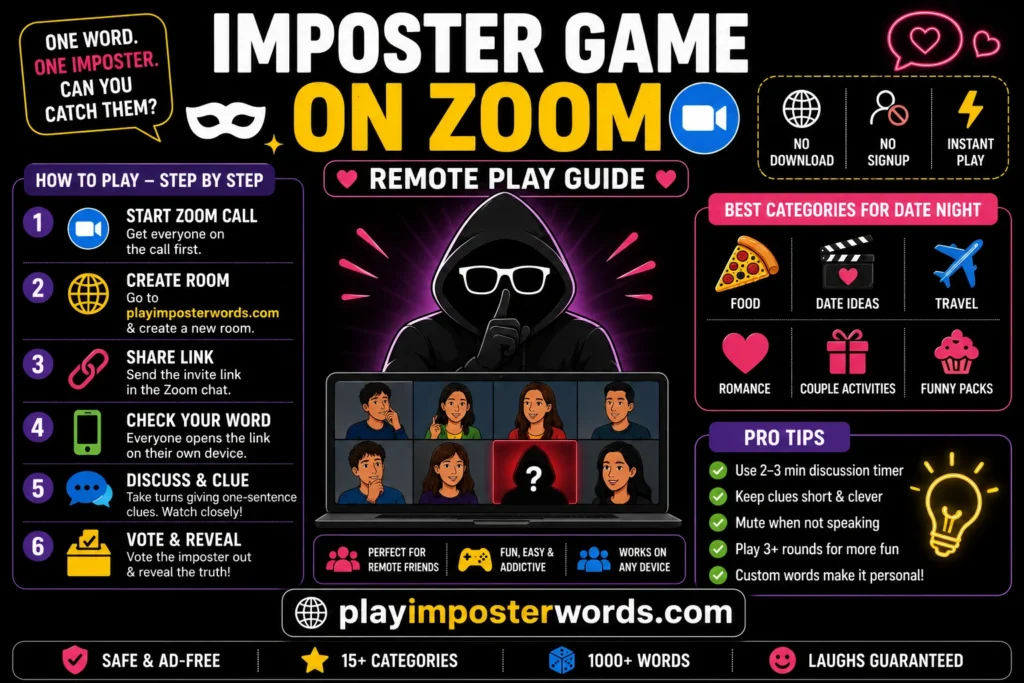
Getting this running takes about three minutes once everyone’s already on the Zoom call. Here’s the exact flow:
Step 1: Start your Zoom call first
Get everyone connected before the game. This matters because you want to watch people’s reactions the moment they read their words.
Step 2: Open the game tool
The host goes to playimposterwords.com and clicks “Create New Room.” Enter your name, choose the number of impostors (one for smaller groups, two if you have 8+ players), pick a word category, and hit Create Room.
Step 3: Share the invite link
The site generates a room code or shareable link. Drop it into your Zoom chat. Everyone clicks it on their own device phone, tablet, or laptop, doesn’t matter.
Step 4: Everyone plays their role privately
Each player sees their screen alone and secretly checks whether they’re a civilian (with the real word) or the imposter. This is the crucial part, no screen sharing here. Everyone keeps their own screen private.
Step 5: Start the discussion round on Zoom
Now everyone takes turns giving a one-sentence clue about their word without saying it directly. Watch who looks nervous. Vote off the person you most suspect.
Step 6: Reveal and argue about it for ten minutes
The reveal is honestly the best part. Half the time, someone’s convinced the imposter was someone completely different.
Choosing the Right Settings for Remote Play
The game’s settings menu isn’t complicated, but a few choices make a big difference for online groups specifically.
Discussion timer: Set it to 2 minutes for groups of 4–6 people. With larger groups, 3 or 5 minutes feels more natural, too short, and people get anxious on camera, too long, and the energy dips. The timing matters. A lot, actually.
Word categories: For a first-time group, stick to Food or Everyday Life. These categories have words familiar enough that civilians can describe them naturally, but tricky enough that an imposter can believably fake it. Sports categories can be rough if not everyone’s into sports; one person going quiet is an instant tell.
“Give impostors a similar word” toggle: Turn this on. It makes the game dramatically harder and more fun. Instead of the imposter having nothing, they get a related but different word, like “Beach” instead of “Ocean.” Now even the imposter can participate without immediately being exposed. Way more entertaining.
Number of impostors: One for 3–6 players, two for 7–12. More than two impostors in smaller groups breaks the balance completely civilians start suspecting each other randomly.
The custom words feature is worth exploring, too. My team once played with office-specific words “the printer,” “the Monday standup,” “Karen from accounting” (not a real person, relax). It got chaotic immediately.
Pro Tips for Running a Smooth Virtual Game Night
- Mute yourself when you’re thinking, not when you’re speaking. This sounds backwards, but ambient background noise on Zoom creates distracting pauses during discussion. Agree beforehand that everyone mutes when it’s not their turn to give a clue; it keeps the game cleaner and makes pauses more readable.
- Use a consistent clue format. Agree that everyone gives exactly one sentence, no follow-up explanations allowed. This stops civilians from accidentally giving away too much and keeps impostors from rambling their way out of trouble.
- Play multiple rounds before switching categories. Your group will get sharper at detecting lying the more rounds they play. The first round is basically tutorial mode. The third round is where people start genuinely sweating.
- Screen share only the voting phase, not the word screen. Some hosts get confused and accidentally screen share their own words to the whole group. Keep screen sharing off until voting, or just don’t use it at all. Everyone’s on their own device anyway.
- Keep the group size between 5 and 8 for Zoom specifically. More than 10 people on a Zoom call makes it genuinely hard to read facial expressions, and the discussion phase becomes chaotic. The sweet spot for remote play is 6 people. Enough voices, small enough to notice everything.
Mistakes That Kill the Vibe
Letting players describe their word in full sentences with lots of detail
The whole game collapses when civilians over-explain. If someone says, “It’s something you eat in the morning that comes in a bowl,” the imposter can just parrot a similar description. Keep clues short and force everyone to stick to brief, single observations.
Playing the first round with stakes
Don’t assign punishments or dares to the first game. Everyone’s still learning how the tool works, what the categories feel like, and how much to say. A low-pressure round one means by round three, people are genuinely competing.
Forgetting to mute between clues on Zoom
This isn’t just about noise; it’s about fairness. If someone’s breathing changes when they read “imposter,” others can hear it. Mute between turns. It sounds paranoid. It’s actually just fair.
Skipping the reveal discussion
After the vote, don’t just restart. Make everyone explain why they suspected who they did. This is where the game becomes genuinely funny and social; someone’s always wrong about something for a completely ridiculous reason, and that’s the actual entertainment.
Frequently Asked Questions
Final Thoughts
The imposter game on Zoom isn’t just a time-filler; it’s one of those rare games where the video call actually adds something instead of making a game feel like a compromise. The expressions, the hesitations, the very suspicious laugh someone does when they’re definitely lying, that’s the whole game.
Set up takes three minutes. The arguments after each round last much longer. Give it a shot with your next remote group and see who in your friend circle is the most disturbingly good liar. You might be surprised.