How to Play Imposter Game Online with Friends
How to Play Imposter Game Online: My friend group almost fell apart over a word game. Not joking. Someone accused the wrong person three rounds in a row, and suddenly, everyone was suspicious of everyone. That’s the magic of the imposter game, and once you know how to play it properly, you’ll never run out of ways to mess with your friends.
Quick Answer:
To play the imposter game online, go to playimposterwords.com, create a room, choose a word category, and share the invite link with friends. Each player gets a secret word. Civilians get the real world; the imposter gets something slightly different. Players discuss, vote, and try to catch the imposter before time runs out. No download needed.
What the Imposter Game Actually Is
Think Among Us, but strip out the spaceship and replace it with words. That’s basically it.
The imposter game is a social deduction word game where most players are civilians who receive the same secret word, say “Pizza,” and one or more impostors receive either nothing or a sneaky, similar word like “Burger.” Everyone then drops hints, makes comments, and tries to figure out who doesn’t actually know the real world.
The civilian goal: catch the imposter before they blend in too well. The imposter’s goal: act like you know exactly what everyone’s talking about without actually knowing.
And this is where it gets genuinely fun. A good imposter doesn’t just stay quiet. They have to perform. Drop the wrong hint, and you’re toast. Stay silent too long, and people notice. It’s basically a lie detector test disguised as a party game.
The version at playimposterwords.com runs entirely in a browser. No app, no account, no annoying setup. You open the site, hit “Create Room,” and you’re already halfway there.
How to Play Imposter Game Online: Step by Step
So you’ve got a group chat open, and everyone’s bored. Here’s exactly how to get a game running in under two minutes.
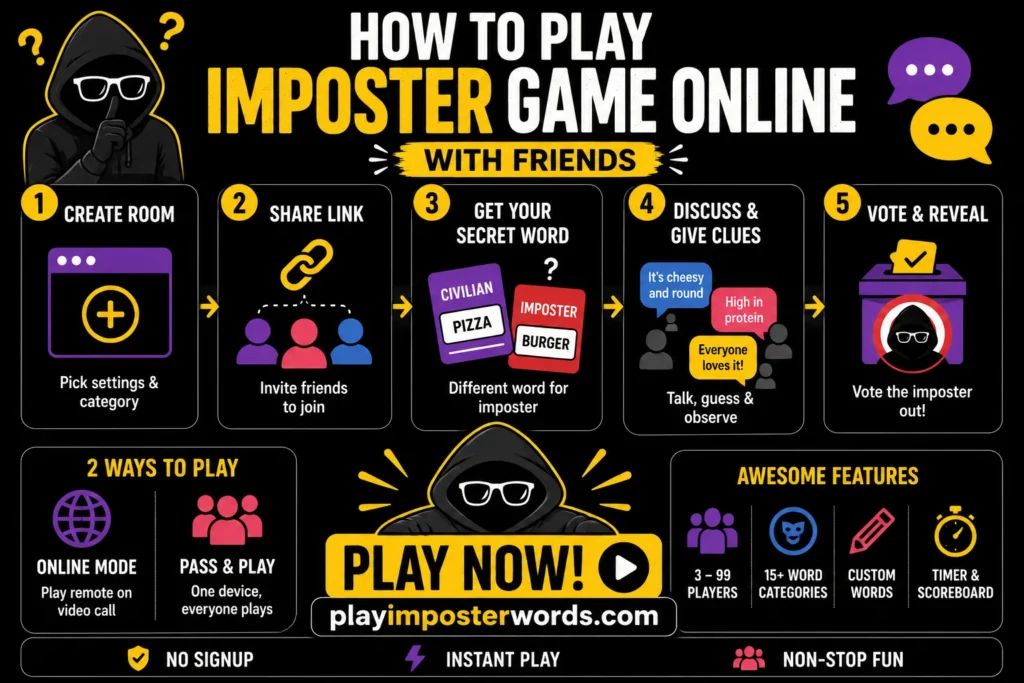
Step 1: Create the Room
Head to playimposterwords.com and click “Create New Room.” Enter your name, pick how many impostors you want, set a discussion timer (2 minutes works great for most groups), and choose a word category.
Step 2: Share the Invite Link
Once the room is created, you get a shareable invite link. Drop it in your group chat. Friends click it, enter their name, and they’re in. No signup. No download. Works on phones, tablets, and desktops equally well.
Step 3: Everyone Peeks Their Role Secretly
Each player taps to reveal their role privately. Civilians see the real word. Impostors see a similar-but-different word or sometimes nothing at all. This part matters. A lot, actually. If someone peeks too slowly or reacts visibly, they’ve already given themselves away.
Step 4: Discussion Phase
Players take turns dropping hints about their word without saying it directly. This is where the social chaos begins. Pay attention to who’s being too vague, too specific, or suspiciously confident.
Step 5: Vote and Reveal
After the timer runs out, everyone votes on who they think the imposter is. The scoreboard then reveals who was right, and the imposter finally gets exposed. Or doesn’t. Either way, someone’s getting roasted in the chat.
Local vs Online Mode: Which One Should You Pick
Here’s something most guides skip over: playimposterwords.com actually offers two completely different ways to play, and picking the wrong one for your situation will make the experience worse.
Online Mode is for remote groups of friends on a video call, coworkers in different cities, and family spread across the country. Everyone joins from their own device using the shared room link. Discussion happens over your video call while the game handles the word assignments.
Pass & Play (Local Mode) is for when everyone’s physically in the same room. One device gets passed around, each player peeks at their role, hands the phone back face down, and the game begins. It works for 3 to 99 players, which makes it perfect for family dinners or house parties.
I’ll be honest, I personally prefer online mode because the reaction delay over video call actually makes it easier to read people. That split-second pause when someone gets their word? Dead giveaway.
Word Categories and Custom Words
One thing that separates playimposterwords.com from the basic versions floating around online is the sheer range of word categories.
You’re not stuck with generic options. The generator covers food, animals, sports, everyday life, funny-themed packs, and more, with over 3,000 words across 15+ categories. That means you can play back-to-back rounds without seeing a repeated word for a long time.
But the custom words feature is where things get genuinely personal. You can add your own word pairs, enter them one per line in the format “Word1 / Word2,” and the generator will use them exactly like the built-in categories. Use inside jokes from your friend group. Use coworker references that only your team would get. Use your city’s local spots.
This is also brilliant for themed events. Running a game night with a Harry Potter theme? Load up “Hogwarts / Durmstrang” and watch people lose their minds trying not to say the obvious thing.
Pro Tips to Win (or Survive) Every Round
- As an imposter, give a hint that’s technically true for both words. If civilians have “Football” and you have “Basketball,” saying “people get really loud watching this” works for both. Specific enough to sound real, vague enough to cover you.
- Set the discussion timer to 2 minutes for first-timers. No timer makes the game drag. Five minutes sounds fun until minute three, when everyone’s just staring at each other. Two minutes keeps the energy tight and the decisions fast.
- Watch who reacts to the word reveal, not who speaks first. New players think the imposter gives themselves away by talking too much. Experienced players watch the face when the word appears. That reaction is involuntary.
- Use “Give impostors a similar word” for beginners. The setting where impostors receive a related word instead of nothing makes the game fairer and more interesting for groups new to social deduction. Disable it for veteran players who want a harder challenge.
- Play with the hint feature turned on for large groups. When you’ve got 10+ players, it’s genuinely hard to track who said what. The hint system helps new players follow along without derailing the round.
Mistakes That Get You Caught Every Time
Waiting too long to give your hint
Silence reads as guilt. Impostors who don’t know the word tend to pause and overthink their answer. Civilians who know the word usually respond naturally. If you’re the imposter, commit to a vague answer quickly, don’t let the pause speak for you.
Being weirdly specific as a civilian
This one surprises people. Sometimes a civilian who knows the word perfectly well describes it so specifically that everyone thinks they’re overcompensating. Keep hints simple and let others fill in the gaps.
Voting too fast in the first round
Rushing the vote in round one almost always eliminates a civilian. The imposter loves early chaos. Give the discussion phase its full time, especially with newer groups.
Ignoring the scoreboard after each round
The scoreboard shows patterns across rounds. If the same person keeps surviving despite being suspected, that tells you something. Pay attention to the cumulative record, not just the current round.
Online Mode vs Local Mode Quick Comparison
| Feature | Online Mode | Pass & Play | Best For |
| Devices needed | One per player | Single shared device | — |
| Setup time | Under 2 minutes | Under 1 minute | — |
| Players | 3 to 99 | 3 to 99 | — |
| Best use case | Remote friends | Same room | — |
| Discussion | Video call + game | In person | — |
Frequently Asked Questions
Final Thoughts
The imposter game is one of those rare things that works for almost any group 4 friends on a Friday night, a team call that needs an icebreaker, a family gathering where everyone’s pretending to like each other. The game does the heavy lifting; you just need to keep a straight face.
Head to playimposterwords.com, create a room, and share the link. The first round takes about 90 seconds to set up. The arguments afterward last considerably longer.
Some friendships don’t survive three rounds. That’s how you know the game is working.